Your WAEC examination is over. You've submitted your last paper, left the examination hall, and now the waiting begins. Between 45-60 days after the last examination date, WAEC releases results. When that day comes, you need to know exactly how to check your result quickly and correctly.
What You Need Before Checking Your Result
Don't rush to any website until you have these items ready:
Your Examination Number - This is the 10-digit number on your examination photocard. It combines your 7-digit centre number with your unique 3-digit candidate number. Example: 1234567089. Write it down somewhere safe because you'll need it for university applications, not just result checking.
WAEC Result Checker Card (Scratch Card) - This card contains two critical numbers: a 12-digit PIN and a serial number. You must purchase this card from authorised vendors. Prices vary between ₦2,500-₦4,000 depending on where you buy. Banks, WAEC offices, and authorised agents sell genuine cards.
Your Examination Year and Type - Know whether you wrote School Candidate (May/June) or Private Candidate (GCE Nov/Dec), and the year. These details determine which database the system searches.
Where to Buy Your Result Checker Card
1. Authorised Banks
Most commercial banks sell WAEC result checker cards. Visit any GTBank, First Bank, UBA, Access Bank, or Zenith Bank branch. Ask for "WAEC result checker" at the counter. They'll sell you the card and give you a receipt. Keep both.
2. WAEC Offices
Every state has a WAEC office that sells result checker cards directly. This guarantees authenticity but might involve queues during peak result-checking periods.
3. Authorised Agents
WAEC licences certain cybercafés and educational centres to sell result checkers. Ask to see their WAEC authorisation certificate before buying. Unauthorised sellers sometimes sell fake or used PINs that won't work.
4. Online Vendors
Some legitimate websites sell WAEC result checkers with instant delivery via email and SMS. Verify the vendor's credibility before paying. Cegital, Cegital Inc, and similar platforms deliver instantly, but confirm they're authorised WAEC vendors.
Warning: Street hawkers selling result checkers often sell fake or already used cards. Avoid them regardless of how cheap their prices seem.
How to Check Your 2026 WAEC Result
They are three ways you can check your WASSCE or GCE result. Follow the steps below:
Method 1: Checking Online (Most Common)
This is the primary method most candidates use. It lets you see your full result breakdown and print it if needed.
Step 1: Visit the Official Portal
Open any web browser and type: www.waecdirect.org
Make sure you type the address correctly. Fake websites exist that look similar but steal your PIN and money. The official site is waecdirect.org - nothing else.
Step 2: Enter Your Details
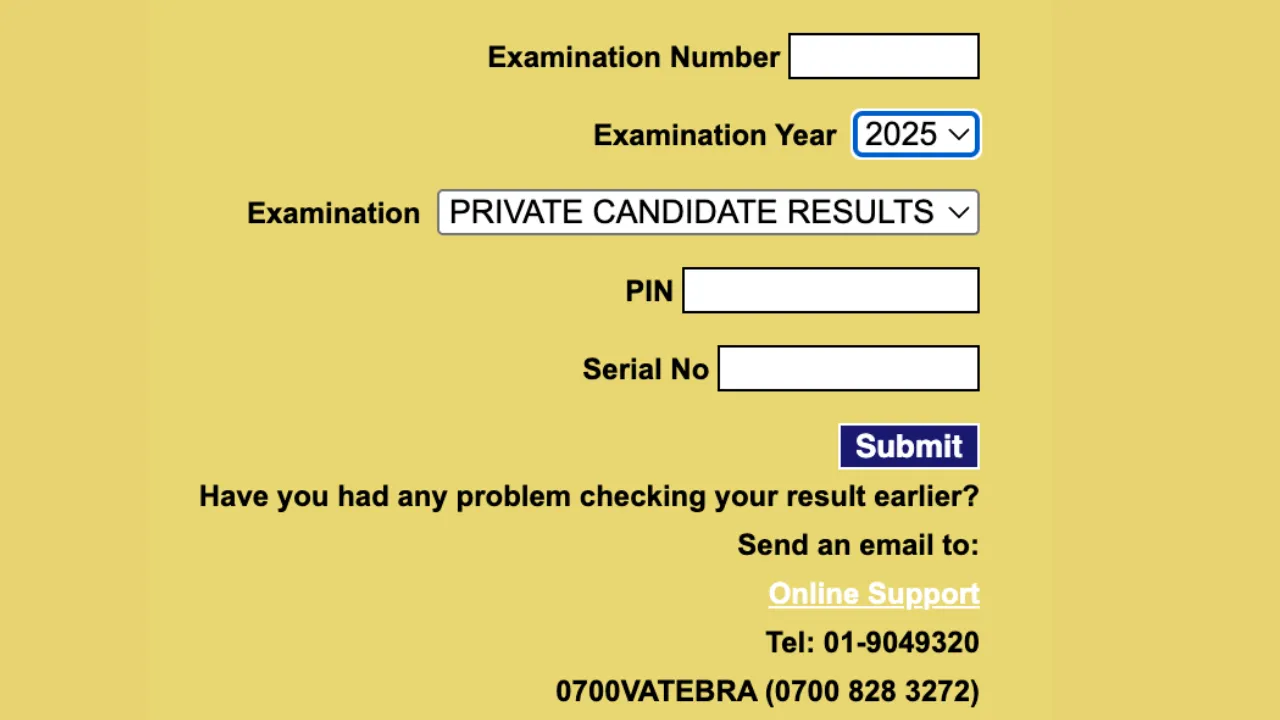
You'll see a result checking page with several fields to fill:
- Examination Number: Type your 10-digit number carefully. Double-check each digit.
- Examination Year: Select the year you wrote the examination from the dropdown menu.
- Examination Type: Choose "School Candidate" if you wrote in your school, or "Private Candidate" if you registered as GCE candidate.
Step 3: Input Your Result Checker Details
Scratch the panel on your result checker card to reveal:
- Card PIN: The 12-digit number
- Card Serial Number: Usually starts with letters followed by numbers
Type both exactly as they appear. One wrong digit means the system rejects your attempt.
Step 4: Submit and View
Click the "Submit" button. Within 5-10 seconds, your result appears on screen.
Your result shows:
- Your full name
- Your examination number
- Each subject you registered for
- The grade you scored in each subject (A1, B2, B3, C4, C5, C6, D7, E8, F9)
- Your aggregate score
Step 5: Print or Save
Use your browser's print function (Ctrl+P on Windows, Cmd+P on Mac) to print your result. Save a PDF copy on your computer, phone, and email it to yourself for backup.
Print at least 3 physical copies. You'll need them for university applications, scholarship forms, and record-keeping.
Method 2: Checking via SMS (Quick Check)
If you just want to know your grades quickly without internet, use the SMS method.
Open your phone's messaging app and compose a new message.
Type exactly: WAECYourExamNumberYourPIN*ExamYear
Replace the italicised parts with your actual details, keeping the asterisks (*) between each section.
Example: WAEC1234567089123456789012*2026
Send this message to: 32327
Within 2-5 minutes, you'll receive a text message showing your grades in all subjects. This costs approximately ₦30 per message, deducted from your airtime.
Note: This method only shows your grades, not your full result slip. You cannot print from SMS results. Use this for quick checking, then use the online method to print your official result.
Method 3: Using the WAEC Mobile App
WAEC has an official mobile application for Android phones available on Google Play Store.
Search for "WAEC Result Checker" in the Play Store and download the app with the WAEC official logo. Be careful - some fake apps exist with similar names.
Open the app and select your country (Nigeria), examination year, and type. Enter your examination number, PIN, and serial number. Tap "Check Result" to view your grades.
The app works exactly like the website but designed for mobile convenience. You can check results from 1980 to present using this app.
When Results Don't Appear
"Invalid PIN or Serial Number"
You've typed something incorrectly. Check your result checker card again and retype carefully. Ensure you're entering the PIN in the PIN field and serial number in the serial field, don't swap them.
If you're certain you typed correctly, your card might be fake or already used. Return to where you bought it and request a replacement. This is why buying from authorised sources matters.
"Examination Number Not Found"
Your examination number doesn't exist in WAEC's database for that year and exam type. Double check you selected the correct year and examination type. If you wrote May/June, don't select Nov/Dec.
If everything is correct but it still doesn't work, visit the nearest WAEC office with your examination photocard. There might be a database error they need to fix.
"Result Not Yet Released"
WAEC hasn't released results for your examination session yet. Results come out in batches over several days, not all at once. Check back every 6-12 hours.
WAEC typically releases results 45-60 days after the last paper. For May/June examinations ending in July, expect results in late August or early September. For Nov/Dec GCE ending in December, expect results in February.
"Result Withheld"
WAEC has flagged your result for investigation. Common reasons include:
- Suspected examination malpractice
- Issues with your registration or documentation
- Your centre being investigated
- Outstanding fees or verification issues
Visit WAEC office immediately to find out why and what documents you need to submit for clearance. Don't wait - withheld results delay your admission process.
How Many Times Can You Check?
One WAEC result checker card is valid for checking one candidate's result up to 5 times. After 5 checks, the PIN expires and you'll need a new card.
Don't waste your checks. Once you successfully view your result, print or screenshot everything immediately. Save multiple copies so you don't need to check repeatedly.
You cannot share your PIN with other candidates. Each person needs their own result checker card.
Checking Old WAEC Results
Need to check a result from 2020, 2015, or even 2000? WAEC's online system stores results from 1980 to present.
Use the same checking methods described above, but:
- Select your actual examination year from the dropdown
- Purchase a current result checker card - old cards don't work for old results
- The process is identical regardless of how old your result is
Many candidates need old results for job applications, postgraduate admissions, or NYSC documentation. WAEC's digital system makes accessing these records straightforward.
What to Do After Checking Your Result
1. If You Passed (5+ Credits Including English & Maths):
Print your result immediately. Make at least 5 copies. Start applying to universities through JAMB CAPS or polytechnics through their portals. Register for Post-UTME screenings at your chosen institutions. Upload your WAEC result to your JAMB profile if you haven't already.
2. If You Failed Some Subjects
Count how many credits you have. If you have 4 credits and failed 1 subject, you can rewrite just that subject in the next WAEC GCE examination (Nov/Dec). You don't need to rewrite subjects you've already passed.
Register as a private candidate for GCE, select only the failed subjects, prepare thoroughly, and try again. Your WAEC result never expires - you can combine results from different years to meet university requirements.
3. If You're Surprised by Your Grades:
WAEC allows result verification if you believe there's been a marking error. Visit any WAEC office and request the verification process. You'll pay a fee and WAEC will re-mark your scripts. This takes 4-6 weeks.
However, verification rarely changes results significantly. The computer based marking system is quite accurate. Only proceed if you genuinely believe something went wrong.
WAEC Digital Certificate
WAEC recently introduced a digital certificate platform at www.waec.org. This lets institutions verify your result electronically without needing physical certificates.
The digital certificate is especially useful for:
- International university applications
- Scholarship applications
- Employment verification
- Professional examinations
Create your account on the platform, verify your identity, and your results become digitally accessible to authorised verifiers worldwide.







1 Comment